How to Measure Why Customers Escalate From a Chatbot
An escalation rate says how often a bot hands off to a person, not why. What to record for each conversation, how to count it, and what QuickBooks and Dropbox changed.
Most chatbot dashboards report an escalation rate: the share of conversations handed to a person. That shows how often the bot gives up, but not why, and the fix for a bot that never learned a topic is different from the fix for one that keeps misreading the question.
To find out why, you have to read each handed-off conversation and record the reason, the same way every time.
Sample report
What the analysis looks like when it is done
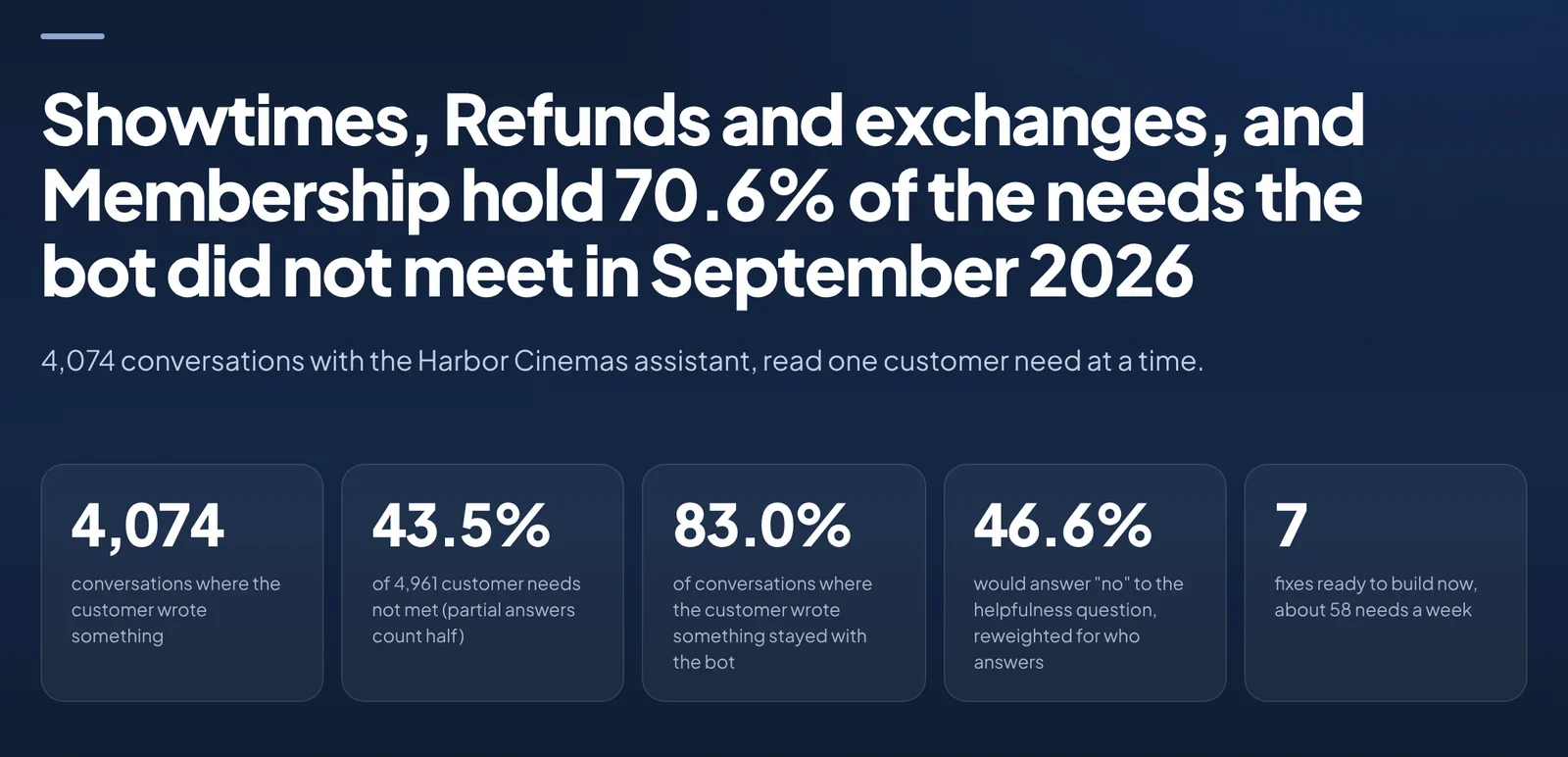
A Dimension Labs chatbot report, run on synthetic data for a fictional cinema chain: topics the bot fails on, how often, and how many fixes are ready.
What counts as an escalation
Start by splitting handoffs by who started them. The categories below are the ones we use; rename them to fit your bot.
The customer asked for a person before the bot tried, or after one bad answer. Some of these are fine. A customer disputing a charge may never want a bot.
The bot handed off because it had no answer, matched the wrong intent or hit its fallback.
A rule sent it, for example an account change that needs a verified agent.
The conversation went in circles and ended with the customer typing "agent" three times.
Only the second and fourth groups are bot failures. A rate that mixes all four can rise because of a new policy and fall because customers gave up, so the number on its own says little about the bot.
Record three things for every conversation
The topic: what the customer needed, in your own categories (billing, password reset, order status).
The outcome: resolved by the bot, handed to a person, or abandoned.
The cause when it was not resolved: the topic is not covered, the bot misunderstood, the answer was incomplete, the customer asked for a person, or a rule required one.
Do it for every conversation if you can, so smaller topics show up in the counts too. A language model can do the reading, which is how we do it, but the categories have to be fixed before it starts or the counts will drift from week to week.
Then count by topic and cause
With the three fields on every conversation, two tables do most of the work. Escalation rate by topic shows where the bot struggles. Cause within each topic shows what to change: a topic that fails because it is not covered needs new content, and one that fails because the bot misunderstood needs better intent training. If you know what a human-handled contact costs, multiply it by the number of avoidable escalations per topic to put the list in order.
Sample report
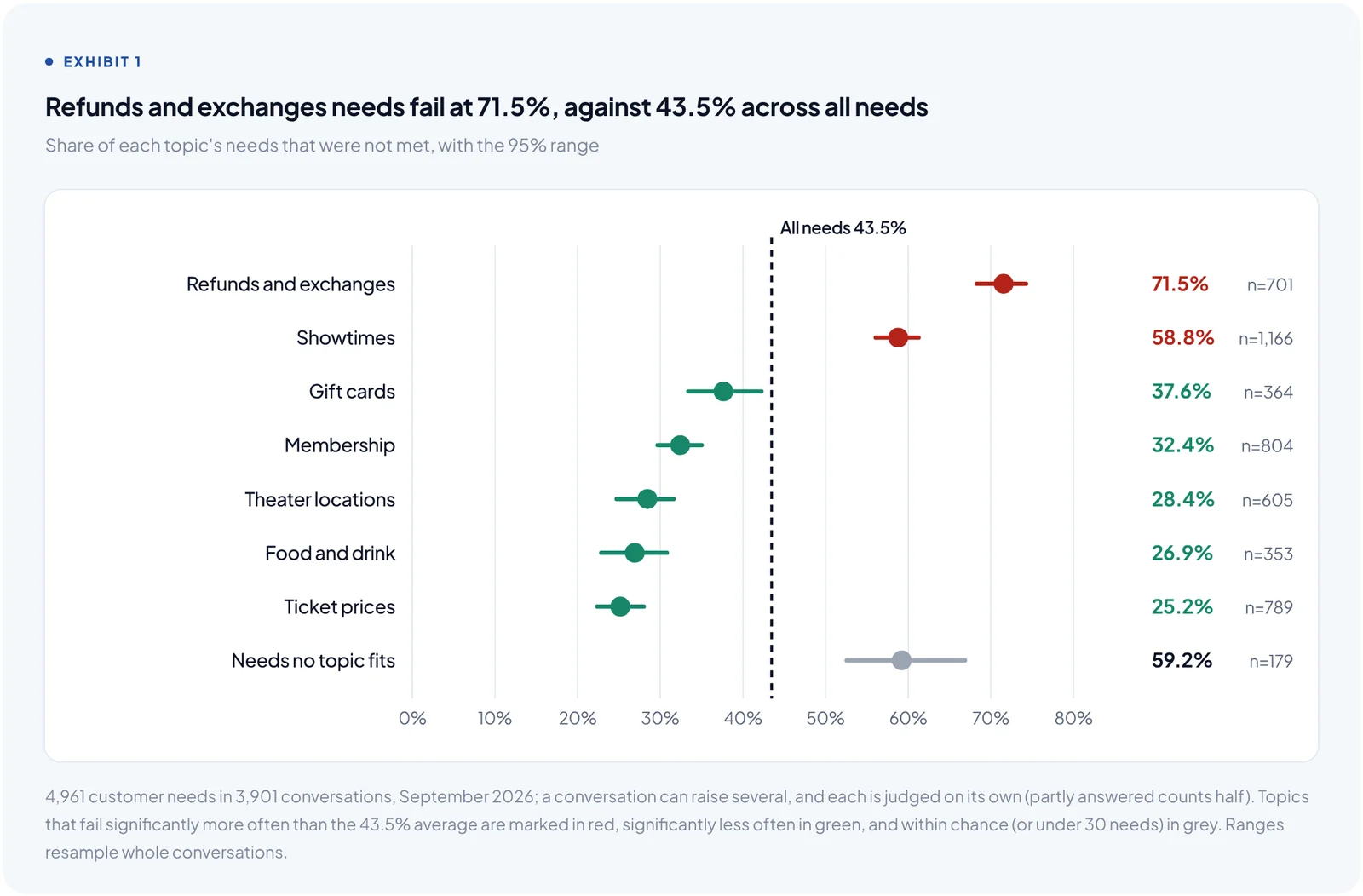
Which topics the bot fails on most, with a range for each
Share of each topic's customer needs the bot did not meet; red topics fail significantly more often than average.
Check the labels before you trust the tables. Read a random set of conversations yourself (we use about 120) without looking at the labels, then compare. Where the bot keeps its own records, such as a handoff flag or a fallback event, the labels should agree with them. If a field disagrees often, fix the definition and run it again.
What changed at two companies that did this
Intuit's QuickBooks Assistant runs more than a million chatbot sessions a month across more than 50 bots. With every session enriched with intent, fallback drivers, escalation triggers and outcome, QuickBooks reported a 57% reduction in human escalations and a 35.3% reduction in the fallback (not handled) intent rate.
Dropbox tagged bot conversations with intent, journey stage, outcome and escalation point, and reported a 43% reduction in unhandled bot conversations, along with 15 times the chat volume handled without costs growing at the same rate.
Customer results
What two teams reported after measuring every conversation
From Dimension Labs case studies; each figure is that company's own before-and-after change.
57%
fewer human escalations
Intuit QuickBooks
35.3%
lower fallback (not handled) intent rate
Intuit QuickBooks
43%
fewer unhandled bot conversations
Dropbox
FAQ
What is a good chatbot escalation rate?
It depends on what the bot is allowed to handle, so a single benchmark is not much use. Track the rate by topic and by cause over time, and watch the bot-failure part most closely.
Should every escalation be prevented?
No. Some requests should go to a person, and making those customers argue with a bot costs more than the handoff. Separate escalations the customer or a rule asked for from the ones where the bot failed, and work on the second group.
Can I measure this from the bot's own analytics?
Partly. Most bot platforms log handoffs and fallback events, which gives you the outcome. The topic and the cause usually live only in the transcript, so someone or something has to read it.
For the wider set of bot metrics, see chatbot analytics: 13 metrics to track. Dimension Labs reads every bot and agent conversation, adds these fields to each one, and shows which topics and causes drive your escalations. See AI agent analytics, or start with one file of transcripts.